
Audit Overview
Your store's untapped revenue potential — and how to unlock it
Why We Created This Audit
We analyzed https://living.fit the same way we've audited 350+ e-commerce stores — looking for the specific gaps between your current experience and what top-performing Health & Wellness (Fitness Equipment) stores deliver. Every finding in this report is a revenue opportunity backed by industry data and competitive benchmarks.
What We Analyzed
- UX & Conversion Design10 findings
- Performance & Speedvs 3 competitors
- Technology & App StackPlatform + 12 apps
- Industry BenchmarksHealth & Wellness (Fitness Equipment)
Pages Analyzed
- Homepage2 findings
- Collection Pages2 findings
- Product Pages (PDP)4 findings
- Cart & Checkout2 findings
 This audit was prepared by Growisto — a CRO-led Website development team behind 167% conversion growth for Atomberg, 46% CR lift for TyresNmore, and 350+ e-commerce projects.
UX & Conversion Findings
Page-by-page analysis with visual comparisons against top Health & Wellness (Fitness Equipment) stores
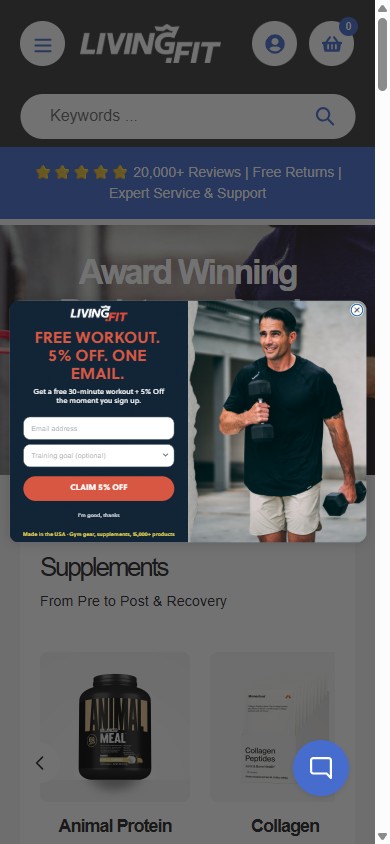
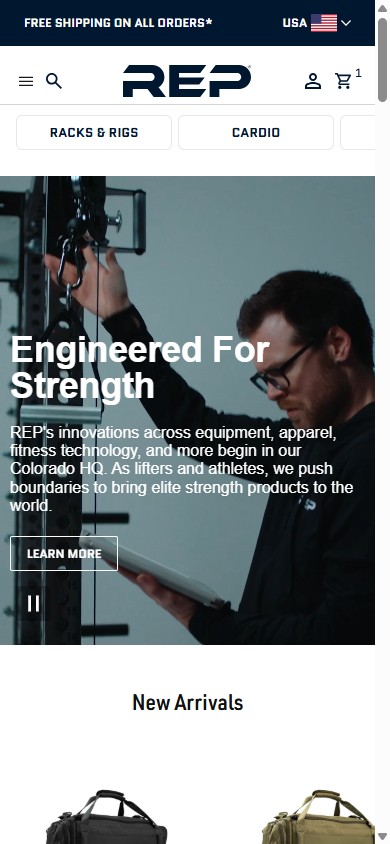
- A full-screen Klaviyo email/SMS popup fires on first homepage load and on PDP load, blocking the hero, navigation, and primary ATC before the visitor can browse.
- The overlay covers most of the mobile viewport with a small close button in the top corner; on PDPs it intercepts shoppers who arrived with high purchase intent from ads or organic search.
- Top fitness equipment competitors (REP Fitness, Rogue Fitness) do not use first-touch homepage popups — they either delay capture to a slide-in after a few seconds, gate on exit-intent, or use a slim sticky bar that doesn't block the hero.
- Mobile shoppers tend to bounce when forced to dismiss an overlay before content loads — this is especially costly on PDPs where the visitor is one tap away from purchase.
- Move the popup trigger from 'on load' to one of: a delay of 20–30 seconds, scroll past 50% of the page, or exit-intent — keep the email capture but don't block the hero.
- Suppress the popup on PDPs where shoppers are mid-purchase; reserve email capture for homepage, collection, and blog pages where intent is exploratory.
- Increase the close-button contrast and tap-target size to 44×44px so users who don't want the offer can dismiss in one tap; cache the dismissal for 30 days.
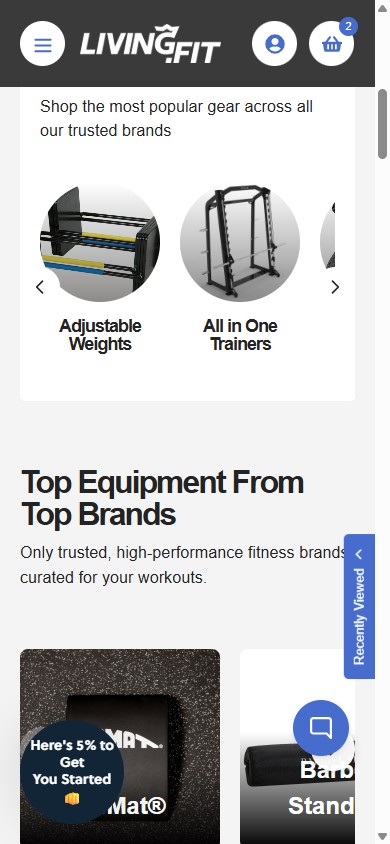
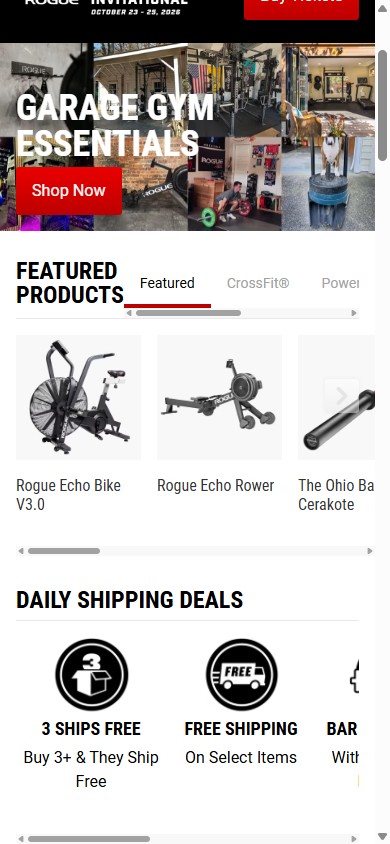
- Living.Fit's homepage opens straight into product-type tiles and featured bestsellers — a strong path for shoppers who already know what they want, but no entry point for a buyer who knows they want a home gym and is overwhelmed by 15,000+ SKUs.
- Most high-AOV home-gym buyers fall into 3 segments — first-time garage builders, upgraders adding to a kit, and athletes shopping for a discipline — but the same homepage layout greets all of them.
- A 3–4 question micro-funnel ('Space you have / Goal / Budget') can hand a first-time builder a curated rack + plates + bar + flooring kit at the end, removing the largest source of analysis paralysis on the catalog.
- Supplement and wellness brands (Onnit, Seed, Moon Juice) use quiz funnels as their primary homepage CTA — the same playbook applied to home gym builders converts the 'I want a setup' demand that today bounces off the catalog grid.
- Add a 'Build Your Gym in 3 Steps' CTA prominent on the homepage hero, linking to a 3–4 question micro-funnel.
- Output of the funnel: a curated bundle PDP (rack + plates + bar + flooring sized to the shopper's space + budget) with the option to customize before adding to cart.
- Reuse the funnel logic to power 'Recommended for you' for returning visitors on the homepage.
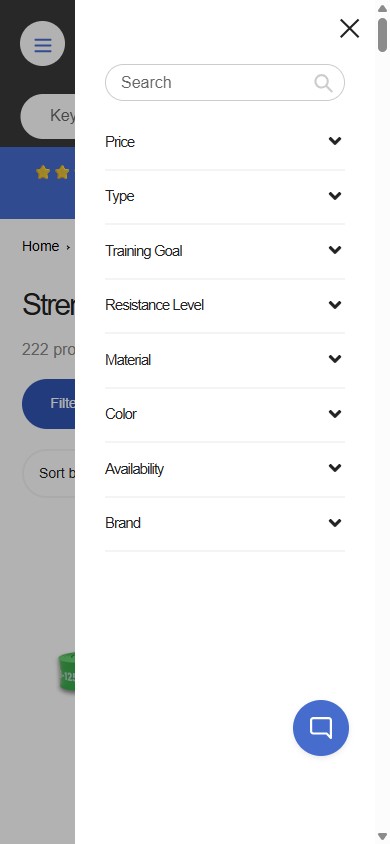
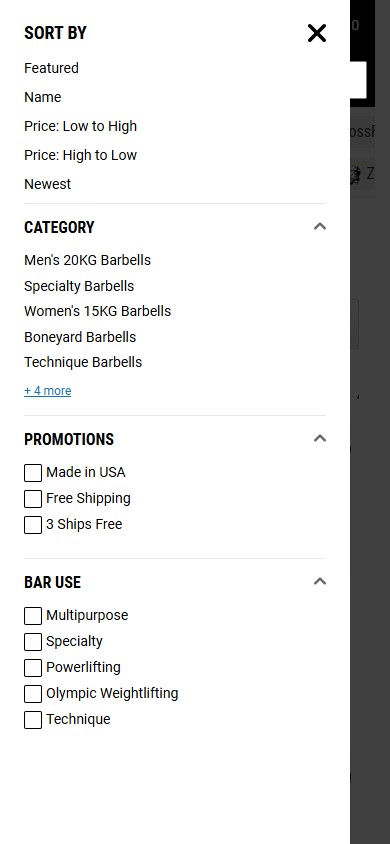
- Living.Fit's filter drawer shows 8 categories (Price, Type, Training Goal, Resistance Level, Material, Color, Availability, Brand) — but every one is collapsed by default with no count next to it.
- A shopper looking at 222 strength products has to tap through every accordion to see what's actually filterable — most users abandon at this friction step rather than explore.
- The Price category is also collapsed, so a buyer can't see at a glance whether they can filter by a custom range or just fixed buckets.
- Rogue Fitness's collection page exposes Sort By plus category and sub-category facets directly on the page, with chip-style filters above the product grid — zero exploration tax.
- Expand the top 3 filters (Price, Type, Training Goal) by default; collapse the rest. Or add a 'quick filter chip' row above the product grid for the most common ranges (Under $100, $100–500, $500+).
- Add facet counts next to every filter option (e.g. 'Bumper Plates (47)') — counts are a known UX confidence signal that reduces 'is this worth clicking?' friction.
- Confirm the Price control is a slider with min/max inputs, not fixed brackets. Fitness equipment has a 100× price spread ($1 flooring → $2,400 Smith Machines) — fixed buckets won't help.
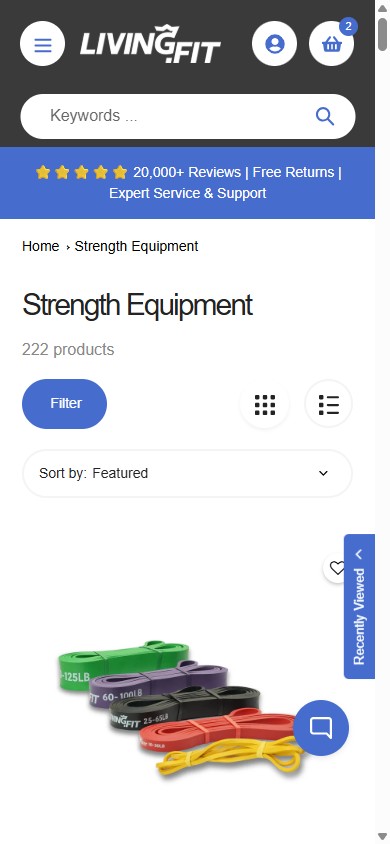
- Living.Fit's collection tiles offer no Compare checkbox, no Add-to-Compare button, and no compare drawer anywhere on the Strength Equipment grid — the only on-tile actions are 'Add to Cart' and 'View Product'.
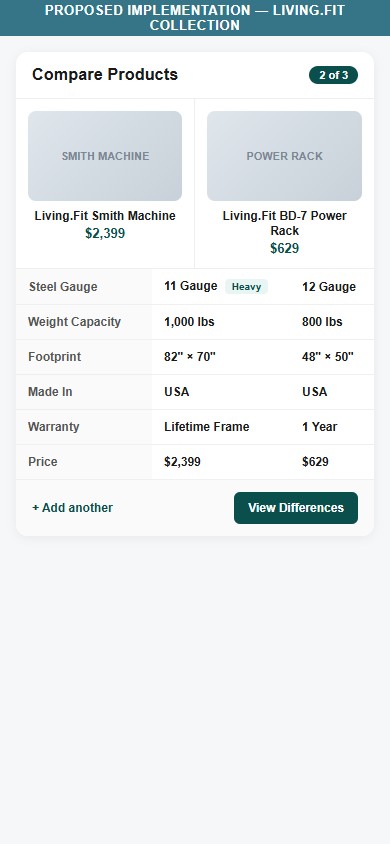
- Equipment shoppers researching a $629 power rack versus a $2,399 Smith Machine versus a $1,299 all-in-one trainer must open each PDP in a new tab and toggle between them to line up specs like steel gauge, weight capacity, footprint, warranty, and country of origin.
- The data needed for a compare table already lives on each PDP — specs are surfaced as bullets and metafields. The gap is purely a collection-page UI: a checkbox row on each tile plus a sticky 'Compare (N)' drawer.
- On high-consideration categories with overlapping use-cases (Racks, Smith Machines, All-in-One Trainers), tab-juggling is a known stall point — a built-in compare keeps shoppers on-site and on-decision.
- Add a 'Compare' checkbox to each tile in the Strength Equipment, Racks, and All-in-One Trainer collections; cap selection at 3 SKUs and surface a sticky 'Compare (N)' chip at the bottom of the viewport.
- Build the compare page as a side-by-side table with the rows shoppers actually decide on: Steel Gauge, Weight Capacity, Footprint, Warranty, Made-In, and Price — pull from existing product metafields.
- Restrict compare to equipment categories above $300 — supplements and accessories don't need it, and adding compare everywhere would clutter low-consideration tiles.
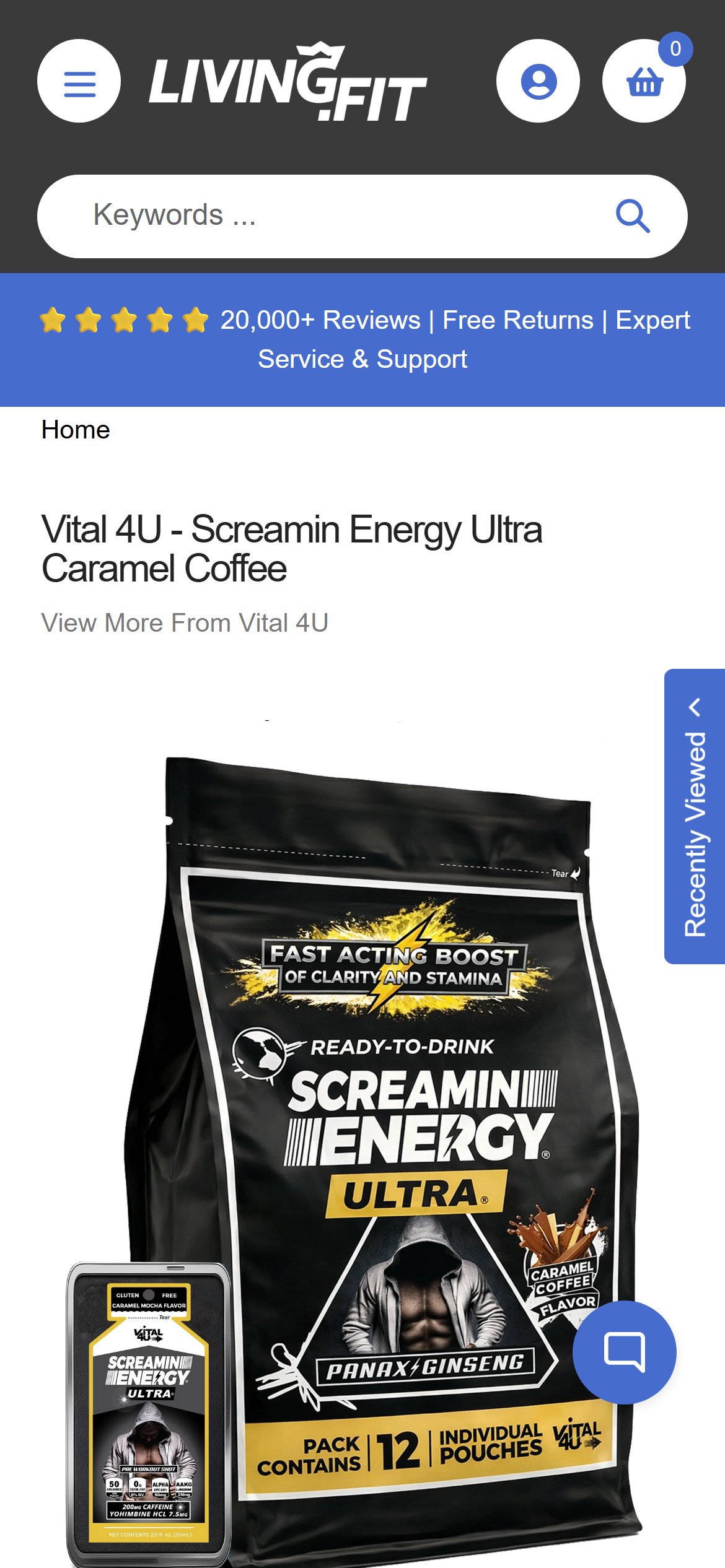
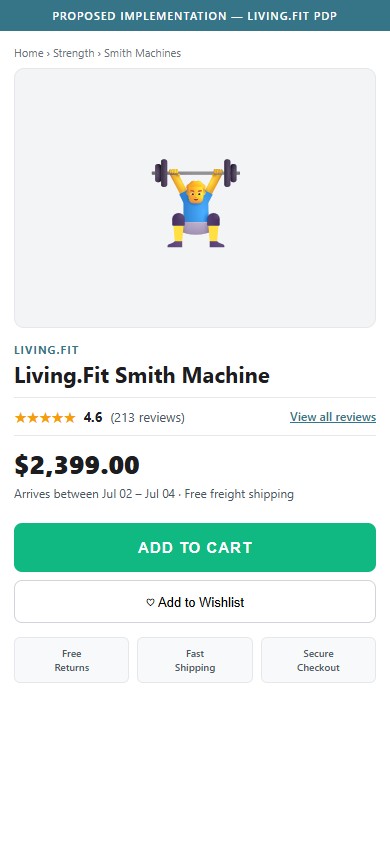
- The PDP shows the product title and 'View More From [Brand]' link, but no star rating, numeric score, or review count appears next to the title or price above the fold.
- A 'What Customers Say About Living.Fit' link sits below the price but routes to a brand-level testimonial — not the SKU's own Judge.me rating, which only appears far below the fold.
- The brand site-wide trust bar advertises '20,000+ Reviews', yet individual PDPs hide per-product social proof until after image, price, ATC, and accordion sections — burying the strongest conversion signal.
- On high-consideration items like the $2,399 Smith Machine, the absence of a per-SKU rating above the fold is especially costly because shoppers expect the credibility check before they read specs.
- Render the Judge.me badge (stars + review count + 'See all reviews' anchor) immediately under the product title on every PDP.
- Make the badge click-anchor to the reviews section below — pairs naturally with the existing Judge.me widget.
- For products with zero reviews, show 'Be the first to review' linked to the write-a-review form rather than hiding the slot entirely.
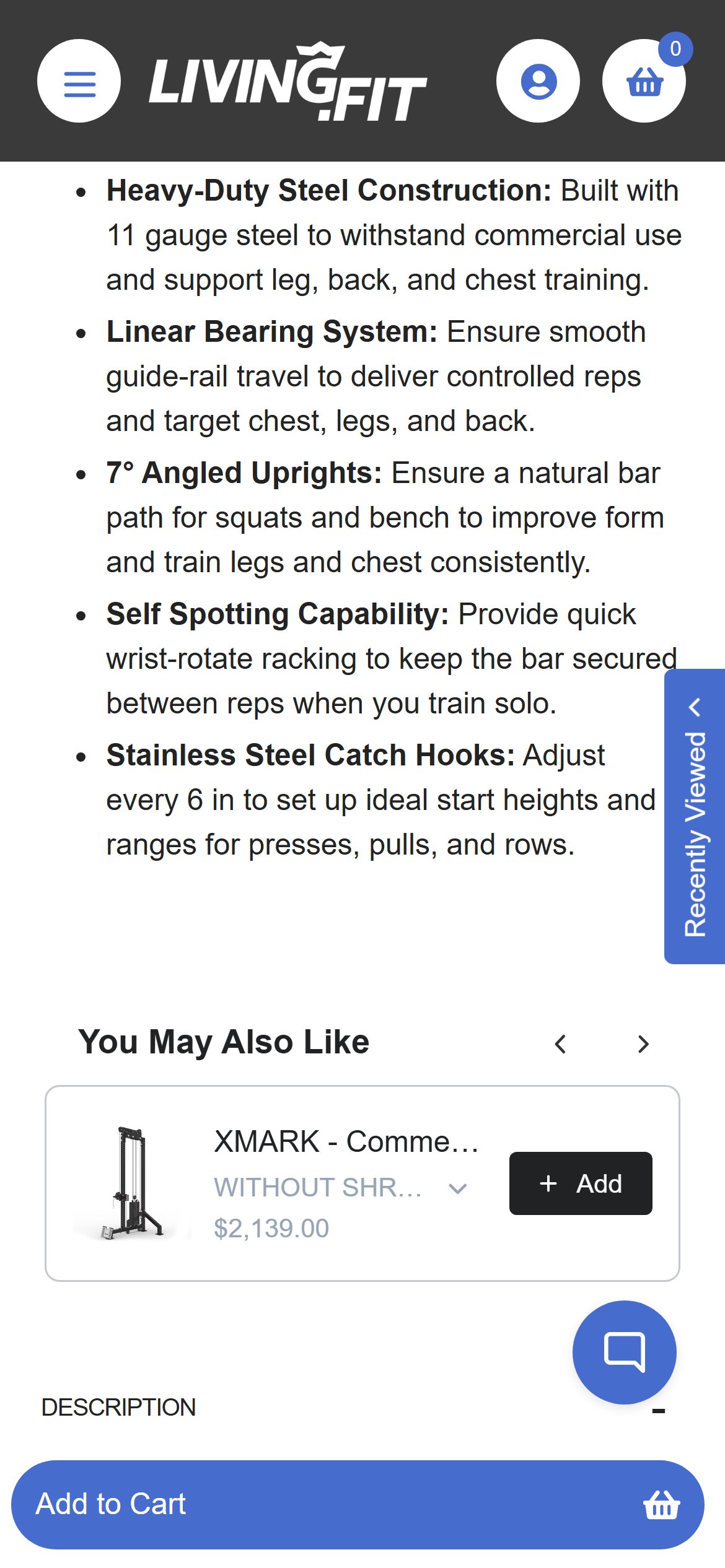
- Living.Fit's Smith Machine PDP at $2,399 does include a bullet referencing '11 gauge steel' inside the product description paragraph — but it sits below the fold, mixed into a paragraph of other features rather than presented as a distinct trust block.
- Above the fold, near the ATC, there is no dedicated row of warranty or spec callouts. The buyer must read paragraph copy to discover build-quality information at the exact moment they're deciding to spend $2,399.
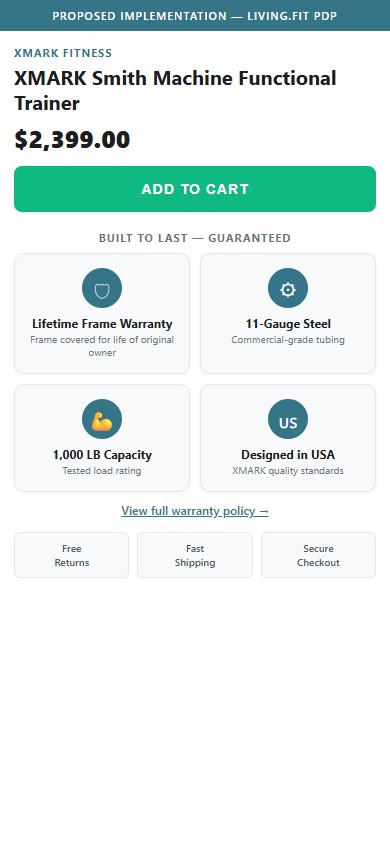
- On a $2,000+ purchase, every minute the buyer spends searching for warranty terms is a minute they're considering closing the tab. Trust callouts (Lifetime Frame Warranty, 11-Gauge Steel, 1,000 LB Capacity, Made in USA) work as decision-shortcut signals.
- Industry leaders surface warranty + capacity + steel-gauge as a 2×2 or icon strip immediately below the ATC — see the proposed mockup for the recommended layout using Living.Fit's actual spec data.
- Add a 2×2 trust-callout grid immediately below the ATC on every equipment PDP above $500 — pull spec data from the existing product metafields where possible.
- Include at minimum: warranty term, weight capacity, steel gauge (or material), country of origin.
- Link 'View full warranty policy' from the warranty card to the dedicated warranty page — buyers who want details get them; buyers who want the headline get it instantly.
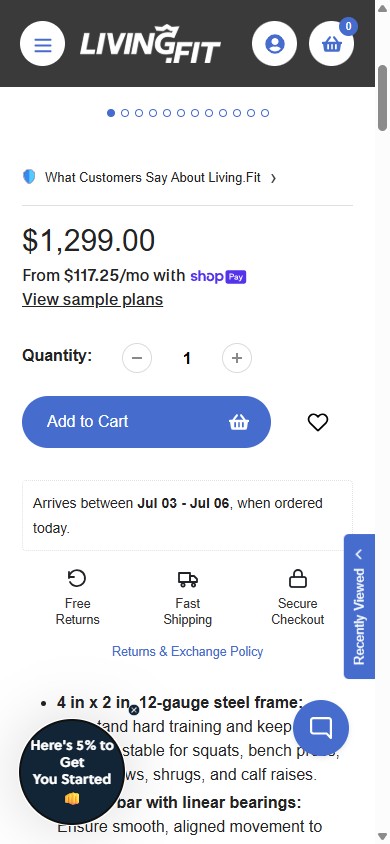
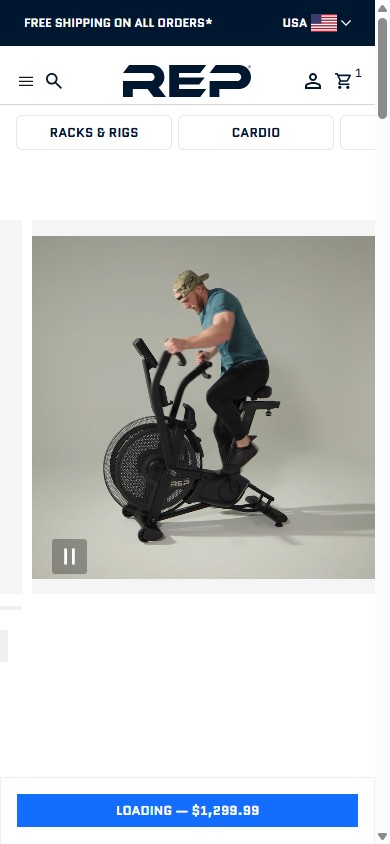
- The Smith Machine PDP gallery contains only still photos — no embedded product video, no YouTube/Vimeo iframe, and no video thumbnail anywhere in the media row.
- For a $1,299 piece of equipment, shoppers want to see the bar path, the assembly, and the build quality in motion — static photos can't show smoothness of travel or footprint relative to a person.
- REP Fitness loads an autoplay product video as the FIRST gallery slot on equipment PDPs; the buyer sees the bike in motion before they read a spec.
- Living.Fit already produces video content (the brand operates a YouTube channel referenced in the footer) — the gap is wiring at least one clip per high-AOV SKU into the Shopify product media.
- Add one short product video (30–60s) as the second gallery item on every equipment PDP above $500 — show range of motion, key trust feature (welds, knurling, frame thickness), and overall scale next to a person.
- Use Shopify's native product video upload so the video is part of the gallery, not buried in the description tab.
- If full video production is heavy, start with a 10s GIF/MP4 of the primary motion (bar travel, seat adjust) — even a short loop is a step-change over static stills.
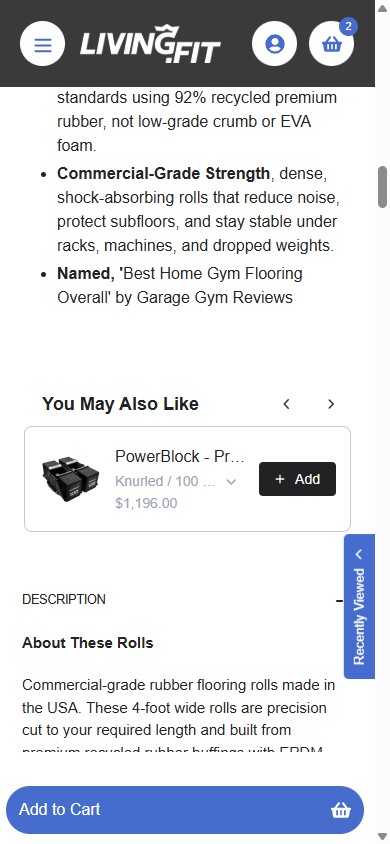
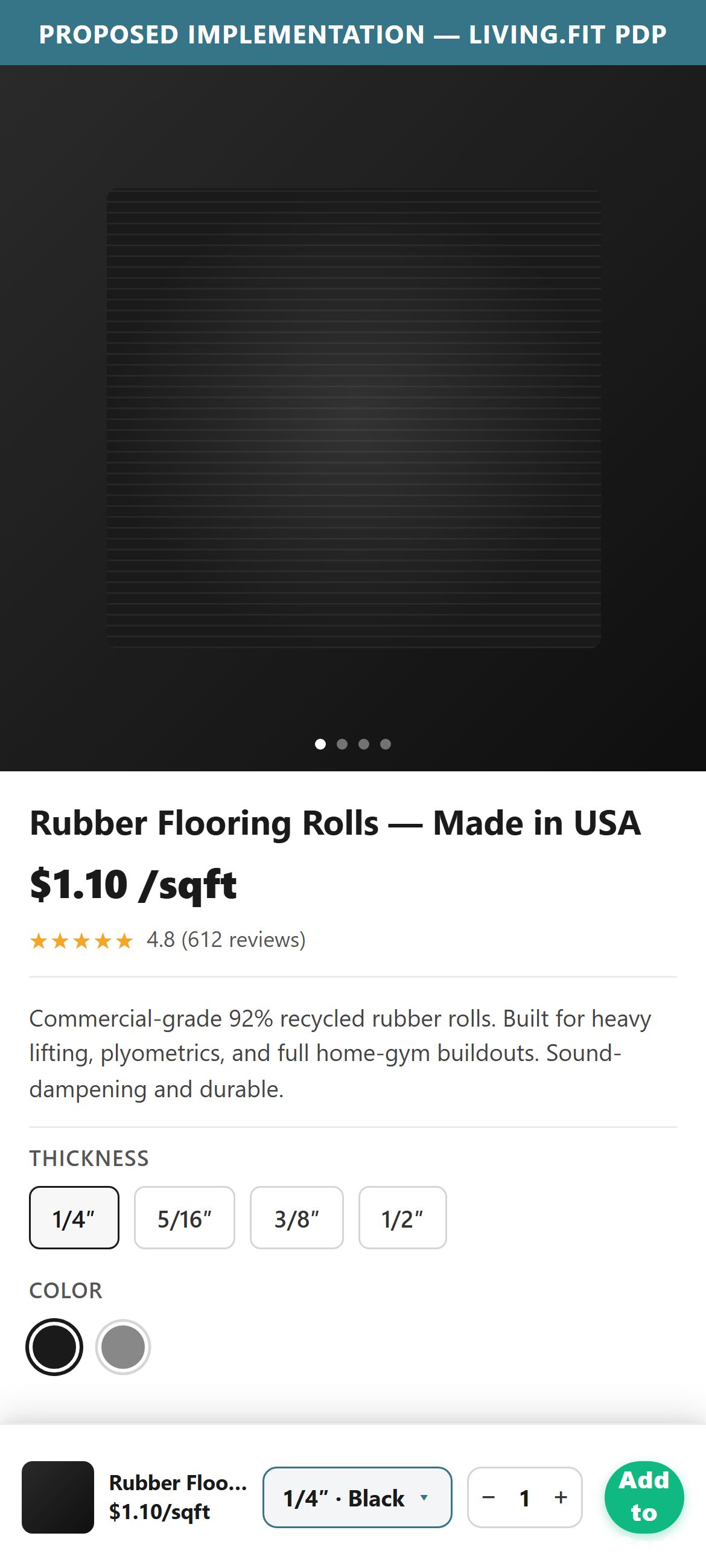
- The Rubber Flooring Rolls PDP has multiple sizes (e.g. 1/4″ / 3/8″ / 1/2″) and color options — the main ATC area lets shoppers pick these. The sticky ATC bar at the bottom of the viewport, however, shows only the product name and an Add to Cart button.
- When a shopper has scrolled past the variant selectors to read specs or reviews, they have to scroll all the way back up to pick a size — every extra scroll is a chance to bounce.
- On products without variants the sticky bar works fine; the gap is specifically on multi-variant SKUs where the bar essentially refuses to function unless the shopper re-engages the main buy box.
- Industry practice: the sticky ATC echoes a compact variant selector (a dropdown or chip row) so shoppers can pick a size and add to cart without scrolling — preserves the entire purpose of having a sticky bar.
- On variant-product PDPs, render a compact size/color selector inside the sticky ATC bar (dropdown for 1+ variant, chip row for 2–3 swatches).
- If a shopper taps Add to Cart in the sticky bar without choosing a variant, surface an inline prompt ("Pick a size first") instead of failing silently.
- For non-variant products, keep the current sticky bar as-is — no change needed.
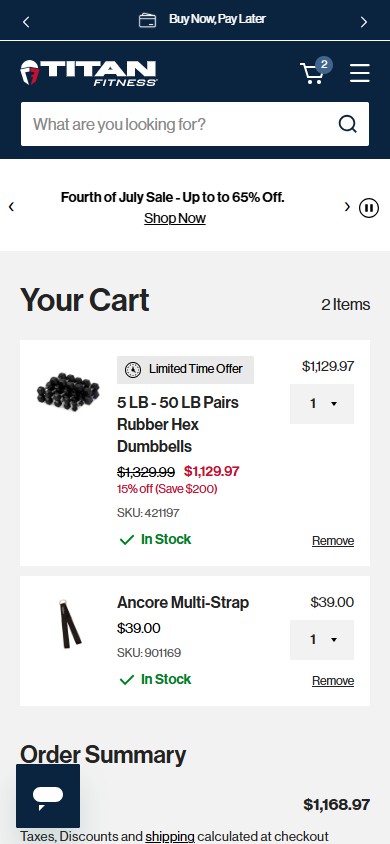
- Manual cart probe confirms no per-line stock messaging, no countdown to next-day dispatch, and no 'items reserved for X minutes' cue anywhere in the cart.
- For high-consideration fitness equipment ($300–$2,500), shoppers routinely park items in the cart for days. Without any urgency, the cart becomes an indefinite holding tank — not a conversion surface.
- Even soft cues like 'Order in 4h 30m for shipping today' (already supported by Living.Fit's 'Arrives between Jul 02 – Jul 04' shipping logic on PDP) would help move stalled carts forward.
- Titan Fitness's cart pairs a 'Limited Time Offer' badge with sale urgency and per-line In-Stock indicators — gives the shopper a visible reason to act now.
- Add an 'Order in X hrs to ship today' countdown driven by the same shipping-cutoff data already powering the PDP delivery estimator.
- Per cart line, show 'Only X left' when stock is below a threshold (e.g. 10 units) — sourced from the existing Shopify inventory feed.
- Optionally: a one-time 'Items reserved for 15:00' soft timer when shoppers reach the cart — keep it honest by not blocking checkout when it expires.
- Living.Fit's PDP shows a clear 'Arrives between Jul 03 – Jul 06' delivery estimate directly under the price — strong commitment, sets expectation.
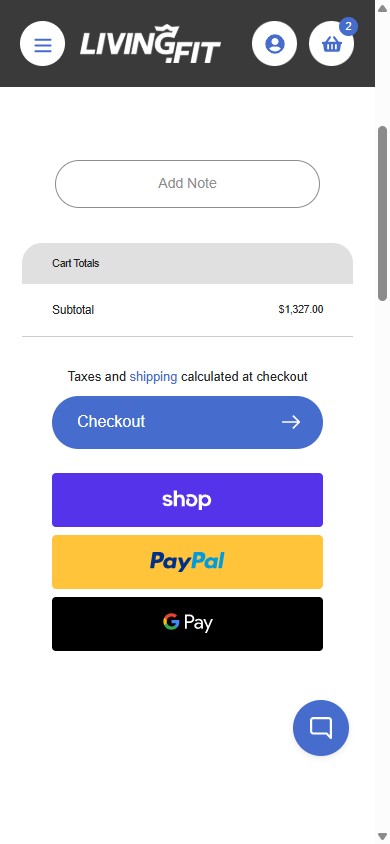
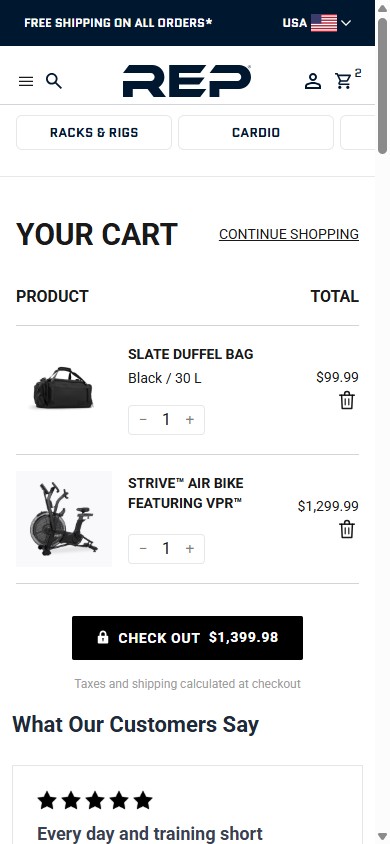
- When the same shopper reaches the cart, that delivery promise disappears: the cart shows only 'Taxes and shipping calculated at checkout' — no date, no ETA, no SLA.
- For a $1,000+ purchase the buyer mentally re-negotiates the trade-off at the cart step ('Is this arriving in time for the weekend? Before my move-in date?'). Stripping the delivery date forces them to either tap back to the PDP or abandon to check elsewhere.
- Carrying forward the same delivery-window logic the PDP already computes is a configuration change, not a build — the data is already there.
- Show the per-line expected delivery window in the cart, using the same logic that powers the PDP estimate.
- Surface a single cart-level summary too ('Your full order arrives between Jul 03 – Jul 06') so multi-item buyers see one ETA at the top.
- If the cart contains items with different ETAs, show the latest date as the headline ('Full order arrives by Jul 06') with a 'See per-item dates' expander.
App Ecosystem
What's installed vs what's missing from best-in-class Health & Wellness (Fitness Equipment) stores
Present (12)
Missing (5)
App Stack Assessment
Living.Fit has built a solid app stack: Judge.me reviews, Klaviyo email, Recharge subscriptions, Swym wishlist, Shop Pay Installments, a custom rewards layer, and full pixel coverage (GA4, Pinterest, TikTok). The two critical gaps are upper-funnel discovery — there is no predictive search and the collection Filter UI is non-functional — which together suppress the percentage of mobile sessions that ever reach an intent-qualified PDP. Klaviyo is configured aggressively (immediate on-load popup) and should be re-triggered on scroll or 30s delay to stop intercepting first-touch sessions on PDPs.
Confidential — Prepared for Living.Fit by Growisto | June 2026